Take a stance first, then we listen, then we build. By the end, we revisit your stance to see what moved.
Vote your gut reaction first. Listen to a five-minute podcast with hidden prompts. Work through five strategies. Revisit the vote at the end to see what moved.
What is the instructor's role in the age of AI?
Which of your own assignments live up to that role?
Responses stay private. Common themes are revealed when we reach the instructor section.
What are your thoughts on the student's role?
Which student behaviors show that role in action?
Themes from this card are revealed when we reach the student section.
What is AI's role in your teaching and your students' learning?
Which tools would you use, and what would you use them for?
Combined with the room's list when we reach the section on AI.
No coaching. No nuance yet. Your honest gut reaction right now. We are saving this number for the end of the hour.
Tap an option to cast a vote.
A framework instructors use to label each assignment with one color, signaling exactly how much AI is allowed on that specific task. The point: stop treating AI as a single yes-or-no rule for the whole course. Start deciding per assignment, on purpose, with a reason students can see.
AI is a full partner here. Students can brainstorm, draft, and revise with it as much as they like. What gets graded is the judgment on top, not the keystrokes underneath.
Use it when the thinking happens after the machine does the grunt work: idea generation, first drafts, code scaffolding, study guides.
AI is welcome, but students have to show how they used it. A prompt log, a short note, a line naming what the tool did versus what they checked. The disclosure counts toward the grade.
Use it when AI helps but verification still matters: research with sources, writing where voice counts, analysis a student must stand behind.
This one is all the student. No AI at any step. The goal is to see the raw skill, the foundational work they need in place before a tool is fair game.
Use it when doing it unaided is the whole point: in-class writing, oral defenses, skills checks, original analysis.
Five minutes. NotebookLM hosts. Listen for the four prompts they slip in.
Your NotebookLM podcast goes here
Auto-loaded from /videos/podcast-main.m4a. Use the button above to swap in a different file on the fly.
Click a card to flip. Tap a colored ball for your call. We reveal the room's picks at the end.
Graduate students must write a 1000-word literature review of recent research on climate adaptation policy.
What color would you give it?
Students design a community engagement plan and identify three stakeholders to interview.
What color would you give it?
Pick one assignment from your own class right now. Just one. Name it.
What color is your assignment right now?
Look at the assignment you just named. What is one of the smallest changes you could make that would either shift its color or make it harder for AI to hand the answer over?
What color is it after your redesign?
Exercise three was your assignment today. Exercise four was the same assignment after one small change. Here is how the room's colors moved, and a space to share what you changed.
What is one small change you made to your assignment? One or two lines is plenty.
You met green, yellow, and red before the podcast. Now put them to work: for each quick scenario, decide the color out loud, as a room. Where the room disagrees is where the real conversation lives.
You did not just hear about a technique. You felt it. You listened on purpose because the work was hidden in the audio. You wrote answers about your own course. AI could not do that for you, because the prompts were tied to something only you know: your class.
Not summarizing. Not describing. Building. A video, a form, a presentation, a podcast, a redesign, a defense. The product is the proof, and the build is the learning.
The move: feed your week's readings into NotebookLM and have the hosts drop three to five little exercises students must catch by listening.
Why it works: turns passive reading into active listening. Works for any subject. Different tool, different mode, same content.
You just experienced this. The podcast you heard is exactly this method, applied to today's topic.
Active listening NotebookLMWhy it works: writing interview questions forces them inside the role. You cannot fake a good question set without actually knowing the job. The product is the proof.
Constructivism Google FormsWeek one: you build a spreadsheet with deliberate errors and record a short screen video walking through it. The video lives only in your course, not on YouTube, not anywhere, so AI cannot summarize it. Students watch and pinpoint where you went wrong in the discussion.
Week two (the heart): students record their own screen-and-voice video fixing those errors. They explain each fix out loud as they show it. That is the throughline in action: they create something only they could make.
Why it works: error analysis is high-order thinking, the private video defeats the AI shortcut, and the student video is "teach it to prove you know it."
Error analysis + creation Screen recorder + spreadsheetYour "spot the mistakes" sample video goes here
Auto-loaded from /videos/professor-errors.mp4. Use the button above to swap.
The move: generate strong images, then turn them into short videos to set up a lesson, illustrate a hard concept, or spark discussion. Custom visuals beat generic stock, and motion holds attention.
Why it works: a 20-second clip you made for this exact lesson lands harder than bullet points, and students remember images far longer than text.
Dual coding Google Flow + Gemini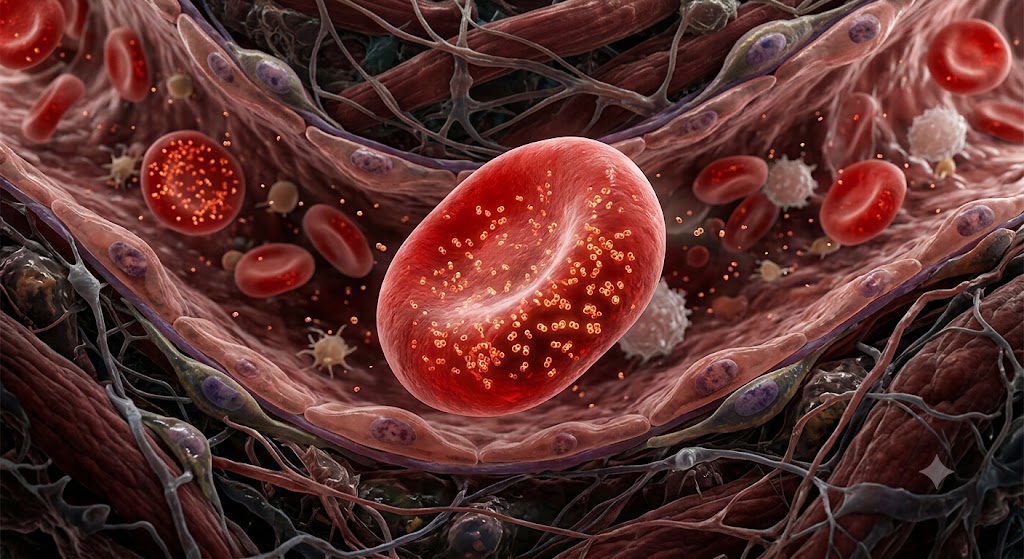
Start with a still image. I asked Gemini to generate a red blood cell. Took about 20 seconds.
Then I dropped that image into Google Flow. Hit play. Same red blood cell, now moving.
The move: instead of sending students to the open web, build the resource yourself, at college level, right here. A grades dashboard, a practice gradebook with nicknames for privacy, model papers, rubrics, study guides.
Why it works: the resource fits your course instead of a generic one, and students get one trustworthy source instead of ten sketchy tabs.
ClaudeResponsible use is a skill we teach, not a rule we post. Three habits do most of the work.
Every submission carries a short AI-use statement: what tool, what for. Normalizes honesty instead of teaching students to hide.
Students state what they verified, what AI got wrong, what they changed. AI is a source to fact-check, not an authority to trust.
Judgment, voice, and final calls stay human. AI can draft. The student decides.
Put one line like this at the bottom of any assignment where AI is allowed. It takes the secrecy out of the room.
Click each habit you expect from a student. Watch the ring fill.
Throw out an interactive component you'd want for your students. We'll pick one and build it together in Claude, live.
Anything you find yourself re-explaining every semester.
Wrong answers branch to targeted hints.
For students to experiment with a process.
Pulls together notes, builds quick-reference cards.
Two quick boxes. First, what would you build for your classroom? A visualization for a tough concept, a simulation, a quiz, a dashboard, a study tool. Then, why would it help your students most?
Before next term, pick one assignment and turn it into something students create.
A video, a form, a podcast, a defense, a build. One assignment. Decide its AI rule on purpose.
This whole page was built with AI. So can yours.
An honest shelf. Match the tool to the verb, pick two, and go deep.
For building dashboards, classroom tools, and student-facing components from a prompt.
Build-anything assistant for dashboards, gradebooks, model papers, rubrics, even this page.
Build itDescribe what you want, get a full-stack web app you can edit and deploy.
Prompt to appAI no-code app builder with database and auth built in. Good for class portals.
No-code appIn-browser dev environment with an AI agent. Run code with your students live.
Build with AIMore technical. AI agents that handle full development workflows.
OpenAI's agentic coding assistant. Plans, edits, runs, tests across a codebase.
Code agentGoogle's agentic IDE with Gemini for end-to-end engineering work.
Agentic IDEBuild and prototype with Gemini models directly, including image and audio.
Prototype with GeminiTurns plain language prompts into UI designs and front-end code.
Design to codeTurn your notes or sources into listenable content for your students.
For lesson visuals, slide decks, custom video for tricky concepts.
Turns images into short video clips for lesson intros and tricky concepts.
Show by videoConversational image generation and editing. Source for Google Flow inputs.
Generate imagesGenerates a full slide deck from a prompt in seconds, then you refine it.
Slides fastDesign handouts and infographics with built-in image and video generation.
Design itFor in-class engagement, research with receipts, and quick visual breakdowns.
Specialized and newer tools. Worth knowing if any match a workflow you have in mind.
Tap your honest reaction now. Compare to the start.
Tap an option to cast a vote.